Menu

Choose your slicer...

and download perfectly tuned filament profiles ready to print!
Bambu Studio
or Orca Slicer
Prusa Slicer
or Super Slicer
How to install
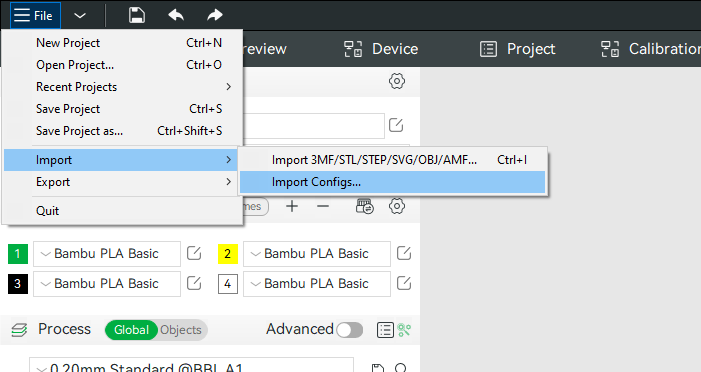
In Bambu Studio navigate to File > Import > Import Configs...
Selected the downloaded zip file. You do not need to extract the zip file beforehand.

Step 1: Allow Download

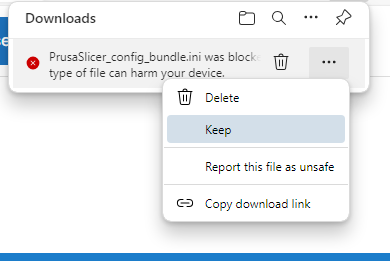
Prusa Slicer config files use the .ini file type which is often incorrectly flagged as malicious.
On Chrome or Edge open the download queue and allow the download.

Step 2: Install Profile

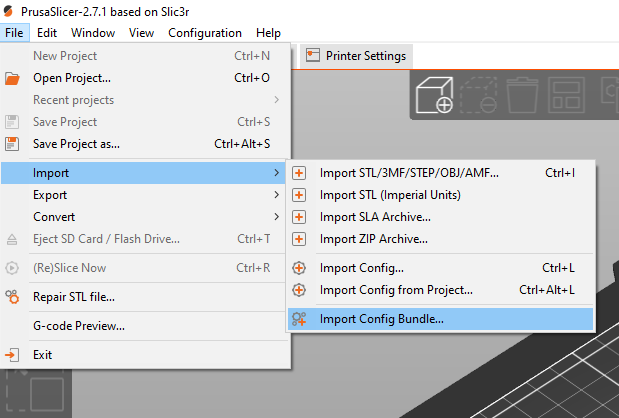
In Prusa Slicer Navigate to File > Import > Import Config Bundle...
Choose the file you just downloaded

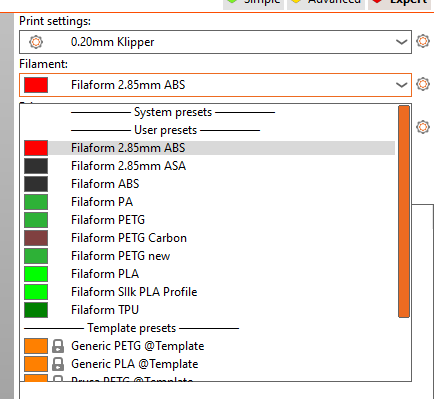
Step 3: Choose your material and slice

You now have all the Filaform materials loaded into the filament panel at the top right of Prusa Slicer.
Advanced Users
Our filament profiles are hosted publicly on GitHub to keep the profiles up to date.
You can visit the repository here and download any individual profiles to test out.

You are welcome to submit pull requests if you believe you can enhance our profile quality further.

Filaform

Filaform is a trademark of 3D Printer Gear PTY LTD. 
Our warehouse is located in Melbourne, Australia
admin@filaform.com.au
1300 334 327
GET IN TOUCH
Terms & Conditions Copyright © 2026 All Rights Reserved
menu-circlecross-circle